Macros are the easy part.
Your client logged 1,840 calories and hit her protein. She is still exhausted at week six. Açaí reads 245 micronutrients from a single photo of her plate, so you can stop guessing and start pointing.
From $74/mo · Free for founding coaches · No card · 93 kcal benchmarked error
A macro log sees four numbers. Every weekly report reads 245.
Open the log. Scroll. Nothing looks wrong.
Chicken, rice, broccoli. Calories in range, protein hit, weight moving roughly as expected. She tells you she is tired, her sleep is poor, and the last two weeks have been hard. You look at the log again.
Nothing looks wrong, because nothing can look wrong. A calorie and macro log has three numbers in it. The answer to why she feels the way she does is not one of the three.
So you say the thing you say when the data cannot tell you anything: let us stay consistent and reassess next week.
Twenty-eight seconds, and you have seen the entire product.
Not a highlight reel and not a mockup. This is a recording of one client’s finished weekly report scrolling from the cover to the methodology, at the pace you would read it. Everything you see is on the page it was recorded from.
Every section, uncut
Week overview, data quality, energy, macros, 245 micronutrients, patterns, actions, ADIME note, methodology.
Real numbers
Sample client is fictional so no real health data sits on a public page. The structure, thresholds and wording are exactly what your clients' reports carry.
Then read it yourself
The report in the film is a live page. Open it, use the contents, check any figure against the methodology section.
Three steps, and only one of them is yours.
 Step one, on her phone
She photographs the plate
Nothing weighed, nothing searched, no barcode. Açaí identifies the ingredients, estimates the portions and returns the full nutrient profile in about three seconds.
Açaí reads all 245
The actual app, unedited and at real speed: point, shoot, and the ingredients come back itemised. Every meal carries its own confidence score, and the week accumulates into one report while you get on with your day.
 Step three, on your desk
You review, edit, release
The report waits for you. Change the wording, drop what does not fit, add what only you know about this client. Then it goes out, with your name on it.
Scroll it yourself. Every one of them.
This is the nutrient list inside the app your client already has, playing at real speed and at a size you can read. Not a marketing graphic of a list: the list.
Watch what goes past. Four tocotrienol isomers, not “vitamin E.” Five separate choline forms. Beta and gamma carotene apart. That granularity is the difference between telling a client to eat more greens and telling her which gap the greens are for.
Unedited screen recording · the in-app nutrient list
Six things you stop doing by hand.
The part no macro tracker can show you.
Every nutrient is compared to its reference target and ranked by risk. Same client, same week, same photos: her calories and protein are fine, her vitamin D sits at 41 percent of target and her sodium at 124 percent of the limit.
- Every nutrient against its own reference target
- Ranked by risk, not printed alphabetically
- Repeat offenders surface week over week
 Sample client, one week
One report per client, every single week.
Eight sections, and every frame below is a screenshot of the live report, not an illustration of one. Hover a section to open it.
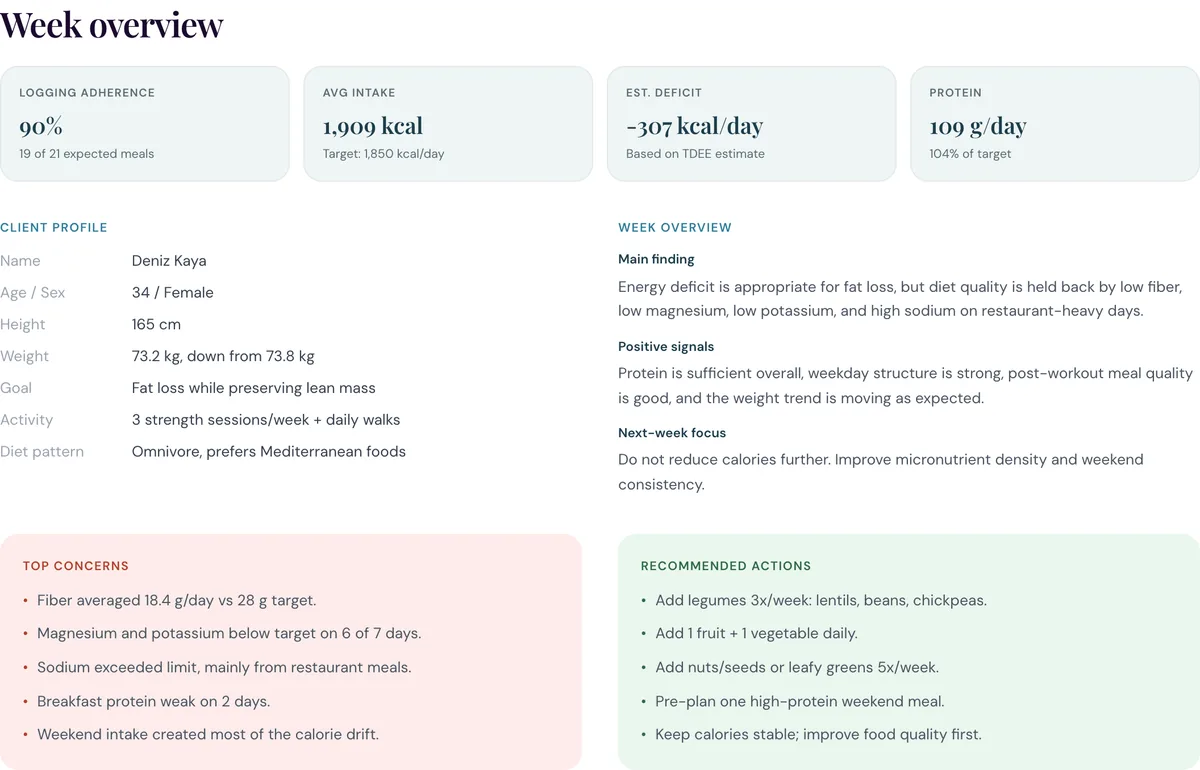
Four numbers, before you open the chat
Logging adherence, average intake, estimated deficit and protein. Enough to know in five seconds whether this week is worth a long reply.
You already know these people. Now you can see them.
The same weekly report answers a different question depending on who is in front of you. Pick one and watch the panel re-read the week.
Tap a client. The report panel re-reads the same week through their situation.
Exhausted at week six, and the log looks perfect.
Energy and protein are where you set them. Fiber, magnesium and potassium have been under target all week and sodium is over the limit. Nothing in a macro log would have shown you this.
The honest version of the comparison.
A macro tracker is not a bad tool. It is a tool for a different question. This is what changes when the log carries 245 nutrients and a confidence score instead of four numbers.
| A written food diary | A macro tracking app | Açaí Professional | |
|---|---|---|---|
| What the client does | Types every item, weighs portions | Searches a database, scans barcodes | Photographs the plate |
| Adherence past week two | Falls away first | Falls away on restaurant days | 90% in the sample week |
| Calories and macros | Yes, if entered honestly | Yes | Yes, 93 kcal benchmarked error |
| Micronutrients | No | A handful, if the entry is complete | 245, against reference targets |
| Confidence per entry | None | None | Scored per meal and per day |
| Weekly clinical note | You write it | You write it | Drafted in ADIME form, you edit it |
| Who approves advice | You | The app, silently | You, before anything reaches the client |
| Cost to you | Your evenings | Per-seat or per-client | $0 as a founding coach |
If a client’s food log is part of your job, this is for you.

Dietitians
An ADIME-ready weekly note and 245 nutrients against reference targets, in intake language.

Personal trainers
See whether the nutrition is holding up the training, without becoming a food-diary nag.

Online coaches
You cannot see what a remote client eats between calls. A photo log closes that gap.

Clinics
Consistent weekly reporting across every practitioner, with per-client consent and an audit log.
One plan. Every feature included, no tiers.
From $74/month, your first 5 clients included.
$9 per additional client. We take 0% of the payments you collect, on every plan.
Free for founding coaches · $0 today · cancel any time
$9 per additional client. Every feature included, no tiers, cancel any time. We take 0% of the payments you collect.
- The weekly report, drafted per client
- Edit, re-word and approve before release
- PDF and CSV export with sensitive-data controls
- Role-based access and an audit log
- No lock-in and no per-transaction fee
The founding cohort is open now and every coach we have written to is in it. Free for that cohort is permanent, not a trial and not a launch price we convert later. The plan above is what it costs to join once the cohort closes.
They use the same Açaí app any other user downloads, on the same terms. Nothing to install for you, and nothing billed to you either way.
- The free tier covers photo logging and the daily readout
- Premium adds the full 245-nutrient history and trends
- $7.99 a month, $59.99 a year, or a one-off lifetime unlock
- Their choice and their card, never a condition of working with you
- Consent to share with you, revocable any time
Store prices as listed on the App Store. Regional pricing, promotional offers and lifetime tiers vary.
Slide to your client count.
Standard-plan figures in USD, so you can see exactly what you would pay and what you would save. Founding coaches pay none of it.
- No lock-in, cancel any time
- 0% payment fee, you keep what you collect
- Every feature included, no tiers
- Free for founding coaches, $0 today
Comparison figures are the publicly listed USD base, per-client and transaction pricing of coach-management platforms in this category, read from their own currency switcher in July 2026. Each market is priced locally rather than converted, so check yours against the slider.
No testimonials here yet. That is the point.
Açaí Professional is opening now, so we are not going to show you a wall of quotes from coaches who have used it for a year. What we can show you is the thing itself: the film above, a complete sample report, a published accuracy benchmark, and the guardrails written down where you can check them.
The founding cohort gets the product free, permanently, and a direct line to the people building it. When your clients’ reports tell you something a macro log never could, we would like to quote you on it.

93 kcal of error. Here is the benchmark.
Mean absolute error of 93 kcal per meal, about twice as accurate as ChatGPT and five times better than the weakest tool in the set. We publish the meal set, the method, and every competitor score, including the ones where we do not win by much.
Where a photo cannot carry the answer, the report says so. Vitamin D is flagged in the sample as low food reliability, consider labs, rather than reported as a clean number.
Read the full accuracy benchmarkNutrition Care Process / ADIME: Assessment, Diagnosis, Intervention, Monitoring & Evaluation.
Compare intake to appropriate DRI/DRV-style references; distinguish target, range, and upper limit.
Prefer measured RMR where available; otherwise transparent estimation (Mifflin-St Jeor or wearable resting energy) with caveats.
Support dietitian-set targets and AMDR-style ranges where appropriate.
Use “intake below target” or “possible inadequacy risk,” not a medical deficiency diagnosis.
Show confidence at meal and report level; never hide uncertain portions or low-confidence photo recognition.
A four-person studio, reachable by reply.
Edgecase Labs builds Açaí. There is no support desk between you and the people who write the code: the address on the form reaches us, and the accuracy benchmark on this site was run by the same four people. If the report gets a flag wrong for one of your clients, tell us and it changes.
 Sadi SaydamFounder
 Can TürkayEngineering
 Cem ÜnüEngineering
 Senih DalProduct
What we wrote while building the nutrient model.
Answered plainly, including the limits.
What does it cost me?+
From $74 a month in the United States, with your first five clients included, then $9 per additional client. Each market is priced locally rather than converted: €64 in Europe, £54 in the United Kingdom, 749 NOK in Norway, 699 SEK in Sweden and 469 DKK in Denmark, each with the same five clients included. Every feature is included, there are no tiers, there is no lock-in, and we take 0 percent of the payments you collect. Founding coaches pay nothing at all: that cohort is open now, every coach we have written to is in it, and free for the founding cohort is permanent rather than a trial. Your clients use the Açaí app, which has a free tier and a paid Premium tier, exactly as any other client of ours would.
How accurate is a photo, really?+
On our benchmark, Açaí's mean absolute error is 93 kcal per meal, roughly twice as accurate as ChatGPT and five times better than the weakest tools we tested. The full method, the meal set, and every competitor score are published on our accuracy page. Each meal in your report also carries its own confidence score, and low-confidence meals are flagged rather than averaged in silently.
Do my clients have to weigh or enter anything?+
No. They photograph the plate. That is the entire logging workflow, which is why adherence in the sample week is 90 percent rather than the drop-off you see by week two with written diaries.
Can the app give my client advice I did not approve?+
No. The report is drafted, then it stops. You review the risk flags and wording, edit the goals, and release it. Supplement, lab, diagnosis, pregnancy, pediatric, renal, diabetes, and medication-related guidance never reaches a client without your approval.
Does it diagnose deficiencies?+
No, and it is written specifically not to. The report says intake below reference target or possible dietary inadequacy risk. It never says diagnosed deficiency. Intake data cannot substitute for labs, symptoms, medication review, and history, and the report says so on the page where the flags appear.
What happens to my client's data?+
The client consents to sharing with you and can revoke it. Access is role-based, there is an audit log, and exports are available as PDF or CSV with sensitive-data controls.
Which nutrients are actually covered?+
245, covering vitamins, minerals, amino acids, fatty acids, and phytonutrients. The weekly report surfaces the ones that moved or crossed a threshold rather than printing all 245 at you, and the full set is available per meal.
Why are there no testimonials on this page?+
Because Açaí Professional is opening now and no coach has used it for a year yet. Rather than borrow quotes from the consumer app or write our own, the page shows the artifact: a complete sample report, a published accuracy benchmark, a film of the report scrolling, and the guardrails written down. When your clients' reports tell you something a macro log never could, we would like to quote you.
How do I start?+
Pick three clients and fill in the form on this page, or reply to the email your sample report came attached to. We will set those three up. Three is enough to see whether the weekly report changes a single check-in conversation, which is the only thing worth judging it on.
Pick three clients. See what you were missing.
Three is enough to know whether a weekly micronutrient readout changes a single check-in conversation. That is the only thing worth judging this on.
- Join the founding cohort and it stays free, permanently. No card.
- Your clients keep the Açaí app they already have.
- One reply from a person, then three invites.
Would rather just email? sarah@edgecaselabs.dev